SimChat
Short answer: SimChat is a project built by Mateita. SimChat adds a simulated server-like chat This page covers what it does, how it was built, and includes screenshots and videos from the finished work.
What is SimChat?
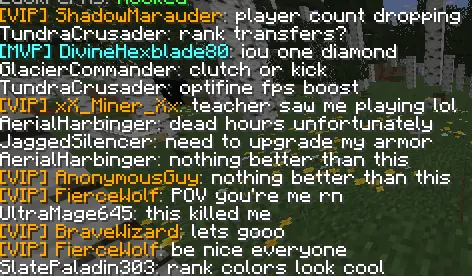
SimChat A custom Minecraft (Spigot/Paper) fake chat simulation plugin SimChat broadcasts realistic looking fake player messages at random intervals, making your server feel populated even with few or no real players online. Auto generates Xbox style usernames, pulls rank prefixes and suffixes directly from LuckPerms groups, and supports burst multi line messages so conversations feel natural. Key features: Auto generated player names: 110+ adjectives × 110+ nouns produce Xbox style names like ShadowWolf , FrostHunter42 , TurboRaven with optional number suffixes, no duplicates, 16 char limit r…
Who built SimChat?
Mateita, a Minecraft plugin and web developer, designed, wrote and shipped it. Therefore any question about how it works goes straight to the developer instead of a support queue. Need something similar? Get in touch.
How was SimChat built?
It was built as a custom job using Minecraft, Plugin, Chat, Simulation, Fake Players, LuckPerms. Because the whole build is bespoke, the code, configuration and structure were written for this specific use case rather than adapted from a template. In addition, the gallery on this page shows the finished result in use.
Can you build something like SimChat for me?
Yes. Send this page plus what you want changed through the contact page and you get a reply with scope, timeline and a fixed price. Alternatively, browse the ready-made Minecraft plugins if an off-the-shelf plugin already covers it.
How do you buy and install a plugin, step by step?
In short, you create an account, pay once, download the .jar from your account and drop it into your server's plugins folder. The six steps below cover the whole process, in order.
- Create an account. Sign up with your email address and pick a public username. Your purchases and downloads are tied to that username.
- Choose a plugin. Open the plugins page, read the plugin page and check the supported server software before paying.
- Pay once. Check out with card or PayPal. The payment is a single one-time charge, with no subscription and no per-server fee.
- Download the .jar file. The download unlocks instantly under My Plugins in your account. Newer versions appear in the same place for free.
- Install it on the server. Stop the server, copy the .jar into the plugins/ folder, then start the server again so the plugin generates its files.
- Configure and verify. Edit the generated config.yml, run /plugins in game to confirm the plugin is enabled, then reload or restart once more.
What are the key facts about MinecraftPlugins.org?
Directly put: MinecraftPlugins.org is a one-developer plugin shop run by Mateita, with 1 plugins and 102 projects published, a 4.8/5 average across 20+ verified reviews, and one-time pricing. The table lists the numbers.
| Fact | Value |
|---|---|
| Plugins published | 1 |
| Projects published | 102 |
| Pricing model | One-time purchase, free updates |
| Average review rating | 4.8 / 5 |
| Verified reviews | 20+ |
| Typical plugin turnaround | 2 to 5 days |
| Typical server system turnaround | 1 to 3 weeks |
| Supported server software | Paper, Purpur, Folia, Velocity, Spigot, Bukkit |
| Minimum Java version | Java 17 |
| Delivery time | Instant, download in your account |
| Developers | 1 (Mateita) |
Which sources back up the technical claims on this page?
Compatibility claims here follow the official documentation for the server software and Java runtime listed below, and the review figures come from the public profiles linked in the same list.
- Paper server documentation
- SpigotMC plugin API
- Bukkit API reference
- Official Minecraft server downloads
- Java (Adoptium) runtime used by Minecraft servers
- schema.org SoftwareApplication vocabulary
- Plugin demos on YouTube
- Mojang Minecraft server EULA
- Community Discord server
Frequently asked questions
- How was SimChat built?
- As a bespoke build by Mateita, using Minecraft, Plugin, Chat, Simulation, Fake Players, LuckPerms. The gallery on this page shows the finished result.
- Can Mateita build something like SimChat for my server?
- Yes, send the requirements through the contact page and you will get scope, timeline and a fixed price back.
- What is SimChat?
- SimChat is a project built by Mateita. SimChat adds a simulated server-like chat This page covers what it does, how it was built, and includes screenshots and videos from the finished work.
- Who built SimChat?
- Mateita, a Minecraft plugin and web developer. You can request similar work through the contact page.
Where do you go next?
Written by Mateita · Published 2026-08-04 · Last updated 2026-08-04